


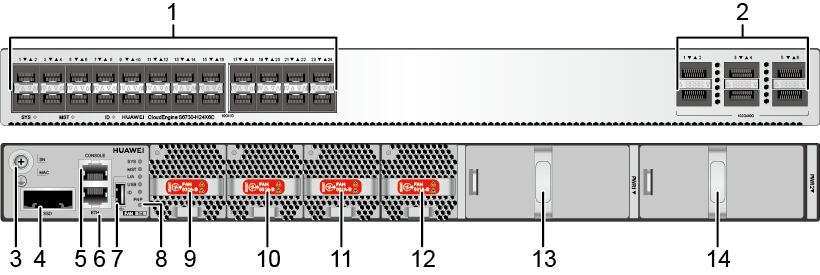
|
1 |
Twenty-four 10GE SFP+ ports Applicable modules and cables:
|
2 |
Six 40GE/100GE QSFP28 optical ports Applicable modules and cables:
NOTE:
A QSFP28 optical port cannot be split into four 10GE ports, regardless of whether the port uses a QSFP28 or QSFP+ optical module. For the S6730-H24X6C (part number: 02352FSG/02352FSG-001/02352FSG-005/02352FSG-007/02352FSG-009):
For the S6730-H24X6C (part number: 02353GFC/02353GFC-001/02353GFC-003/02353GFC-004), the license has been activated and QSFP28 ports on the switch work as 100GE ports. |
|
3 |
Ground screw NOTE:
It is used with a ground cable.
|
4 |
SSD card slot NOTE:
This slot is reserved for future use. |
|
5 |
One console port |
6 |
One ETH management port |
|
7 |
One USB port |
8 |
One PNP button NOTICE:
To restore the factory settings and reset the switch, hold down the button for at least 6 seconds. To reset the switch, press the button. Resetting the switch will cause service interruption. Exercise caution when you press the PNP button. |
|
9 |
Fan module slot 1 NOTE:
Applicable fan module: FAN-031A-B (Fan Box (B, Fan Panel Side Exhaust)) |
10 |
Fan module slot 2 NOTE:
Applicable fan module: FAN-031A-B (Fan Box (B, Fan Panel Side Exhaust)) |
|
11 |
Fan module slot 3 NOTE:
Applicable fan module: FAN-031A-B (Fan Box (B, Fan Panel Side Exhaust)) |
12 |
Fan module slot 4 NOTE:
Applicable fan module: FAN-031A-B (Fan Box (B, Fan Panel Side Exhaust)) |
|
13 |
Power module slot 1 NOTE:
Applicable power module:
|
14 |
Power module slot 2 NOTE:
Applicable power module:
|
10GE SFP+ optical port
| Attribute | Description |
|---|---|
| Connector type | LC/PC |
|
Optical port attributes |
Depend on the optical module used |
| Standards compliance | IEEE802.3ae |
| Working mode | GE/10GE auto-sensing |
40GE/100GE QSFP28 optical port
| Attribute | Description |
|---|---|
| Connector type | MPO/LC |
| Optical port attributes | Depend on the optical module used |
| Standards compliance | IEEE802.3ba |
| Item | Description |
|---|---|
|
Memory (RAM) |
4 GB |
|
Flash |
2 GB in total. To view the available flash memory size, run the display version command. |
|
Mean time between failures (MTBF) |
62.27 years |
|
Availability |
> 0.99999 |
|
Service port surge protection |
N/A |
|
Power supply surge protection |
|
|
Dimensions (H x W x D) |
|
|
Weight (with packaging) |
8.9 kg (19.62 lb) |
|
Stack ports |
|
|
RTC |
Supported |
|
RPS |
Not supported |
|
PoE |
Not supported |
|
Rated voltage range |
|
|
Maximum voltage range |
|
|
Maximum power consumption (100% throughput, full speed of fans) |
254 W |
|
Typical power consumption (30% of traffic load, tested according to ATIS standard) |
149 W |
|
Operating temperature |
-5°C to +45°C (23°F to 113°F) at an altitude of 0-1800 m (0-5906 ft.)
NOTE:
When the altitude is 1800-5000 m (5906-16404 ft.), the highest operating temperature reduces by 1°C (1.8°F) every time the altitude increases by 220 m (722 ft.). The switch cannot be started when the ambient temperature is lower than 0°C (32°F). The operating temperature of the switch is -5°C to 40°C (23°F to 104°F) when it uses QSFP-100G-ER4 optical module. |
|
Storage temperature |
-40°C to +70°C (-40°F to +158°F) |
|
Noise under normal temperature (27°C, sound power) |
< 65 dB(A) |
|
Relative humidity |
5% to 95%, noncondensing |
|
Operating altitude |
0-5000 m (0-16404 ft.) |
|
Certification |
|
|
Part number |
02352FSG 02352FSG-001 02352FSG-005 02352FSG-007 02352FSG-009 02353GFC 02353GFC-001 02353GFC-003 02353GFC-004 |
| Module Name | Maximum Transmission Distance |
| FE SFP/eSFP Optical Modules | |
| SFP-FE-SX-MM1310 | 2 km |
| eSFP-FE-LX-SM1310 | 15 km |
| S-SFP-FE-LH40-SM1310 | 40 km |
| S-SFP-FE-LH80-SM1550 | 80 km |
| SFP-FE-LX-SM1310-BIDI (Single-Fiber-Bidirectional Module) | 15 km |
| SFP-FE-LX-SM1550-BIDI (Single-Fiber-Bidirectional Module) | 15 km |
| GE eSFP Optical Modules | |
| eSFP-GE-SX-MM850 |
|
| SFP-GE-LX-SM1310 | 10 km |
| S-SFP-GE-LH40-SM1310 | 40 km |
| S-SFP-GE-LH40-SM1550 | 40 km |
| S-SFP-GE-LH80-SM1550 | 80 km |
| eSFP-GE-ZX100-SM1550 | 100 km |
| SFP-GE-LX-SM1310-BIDI (Single-Fiber-Bidirectional Module) | 10 km |
| SFP-GE-LX-SM1490-BIDI (Single-Fiber-Bidirectional Module) | 10 km |
| LE2MGSC40DE0 (Single-Fiber-Bidirectional Module) | 40 km |
| LE2MGSC40ED0 (Single-Fiber-Bidirectional Module) | 40 km |
| SFP-GE-ZBXD1 (Single-Fiber-Bidirectional Module) | 80 km |
| SFP-GE-ZBXU1 (Single-Fiber-Bidirectional Module) | 80 km |
| SFP-GE-BXU1-SC (Single-Fiber-Bidirectional Module) | 10 km |
| GE CSFP Optical Modules | |
| CSFP-GE-FE-BXD1 | 10 km |
| CSFP-GE-FE-BIDI2 | 20 km |
| CSFP-GE-FE-BIDI4 | 40 km |
| GE-CWDM eSFP Optical Modules | |
| CWDM-SFPGE-1471 | 80 km |
| CWDM-SFPGE-1491 | 80 km |
| CWDM-SFPGE-1511 | 80 km |
| CWDM-SFPGE-1531 | 80 km |
| CWDM-SFPGE-1551 | 80 km |
| CWDM-SFPGE-1571 | 80 km |
| CWDM-SFPGE-1591 | 80 km |
| CWDM-SFPGE-1611 | 80 km |
| GE-CWDM eSFP Optical Modules | |
| CWDM-SFPGE-1271 | 80 km |
| CWDM-SFPGE-1291 | 80 km |
| CWDM-SFPGE-1311 | 80 km |
| CWDM-SFPGE-1331 | 80 km |
| CWDM-SFPGE-1351 | 80 km |
| CWDM-SFPGE-1371 | 80 km |
| CWDM-SFPGE-1391 | 80 km |
| CWDM-SFPGE-1411 | 80 km |
| CWDM-SFPGE-1431 | 80 km |
| CWDM-SFPGE-1451 | 80 km |
| CWDM-SFPGE-1471 | 80 km |
| CWDM-SFPGE-1491 | 80 km |
| CWDM-SFPGE-1511 | 80 km |
| CWDM-SFPGE-1531 | 80 km |
| CWDM-SFPGE-1551 | 80 km |
| CWDM-SFPGE-1571 | 80 km |
| CWDM-SFPGE-1591 | 80 km |
| CWDM-SFPGE-1611 | 80 km |
| GE-DWDM eSFP Optical Modules | |
| DWDM-SFPGE-1560-61 | 120 km |
| 10GE SFP+ Optical Modules | |
| SFP-10G-USR | 0.1 km |
| OSXD22N00 |
|
| OMXD30000 |
|
| SFP-10G-iLR | 1.4 km |
| OSX010000 | 10 km |
| OSX040N01 | 40 km |
| SFP-10G-ER-1310 | 40 km |
| SFP-10G-ZR | 80 km |
| SFP-10G-BXU1 (Single-Fiber-Bidirectional Module) | 10 km |
| SFP-10G-BXD1 (Single-Fiber-Bidirectional Module) | 10 km |
| SFP-10G-ER-SM1330-BIDI (Single-Fiber-Bidirectional Module) | 40 km |
| SFP-10G-ER-SM1270-BIDI (Single-Fiber-Bidirectional Module) | 40 km |
| 10GE XFP Optical Modules | |
| XFP-SX-MM850 |
|
| XFP-STM64-LX-SM1310 | 10 km |
| XFP-STM64-LH40-SM1550 | 40 km |
| XFP-STM64-SM1550-80km | 80 km |
| 10GE-CWDM SFP+ Optical Modules | |
| SFP-10G-ZCW1471 | 70 km |
| SFP-10G-ZCW1491 | 70 km |
| SFP-10G-ZCW1511 | 70 km |
| SFP-10G-ZCW1531 | 70 km |
| SFP-10G-ZCW1551 | 70 km |
| SFP-10G-ZCW1571 | 70 km |
| SFP-10G-ZCW1591 | 70 km |
| SFP-10G-ZCW1611 | 70 km |
| 10GE-CWDM XFP Optical Modules | |
| CWDM-XFP10G-1471 | 70 km |
| CWDM-XFP10G-1491 | 70 km |
| CWDM-XFP10G-1511 | 70 km |
| CWDM-XFP10G-1531 | 70 km |
| CWDM-XFP10G-1551 | 70 km |
| CWDM-XFP10G-1571 | 70 km |
| CWDM-XFP10G-1591 | 70 km |
| CWDM-XFP10G-1611 | 70 km |
| 10GE-DWDM SFP+ Optical Modules | |
| SFP-10G-ZDWT | 60 km |
| 10GE-DWDM XFP Optical Modules | |
| DWDM-XFP10G-1533-47 | 80 km |
| DWDM-XFP10G-1534-25 | 80 km |
| DWDM-XFP10G-1535-04 | 80 km |
| DWDM-XFP10G-1552-52 | 80 km |
| DWDM-XFP10G-1553-33 | 80 km |
| DWDM-XFP10G-1554-13 | 80 km |
| DWDM-XFP10G-1530-33 | 80 km |
| DWDM-XFP10G-1549-32 | 80 km |
| DWDM-XFP10G-1531-12 | 80 km |
| DWDM-XFP10G-1531-90 | 80 km |
| DWDM-XFP10G-1550-12 | 80 km |
| DWDM-XFP10G-1550-92 | 80 km |
| DWDM-XFP10G-1532-68 | 80 km |
| DWDM-XFP10G-1551-72 | 80 km |
| DWDM-XFP10G-1529-55 | 80 km |
| DWDM-XFP10G-1548-51 | 80 km |
| 40GE QSFP+ Optical Modules | |
| QSFP-40G-SR4 |
|
| QSFP-40G-iSR4 |
|
| QSFP-40G-eSR4 |
|
| QSFP-40G-iSM4 | 1.4 km |
| QSFP-40G-eSM4 | 10 km |
| QSFP-40G-LX4 |
Single-mode fiber: 2 km Multimode fiber (OM3): 0.15 km |
| QSFP-40G-LR4 | 10 km |
| QSFP-40G-ER4 | 40 km |
| QSFP-40G-SR-BD |
|
| QSFP-40G-SDLC-PAM |
|
| QSFP-40G-eSDLC-PAM |
|
| 40GE CFP Optical Modules | |
| CFP-40G-SR4 |
|
| CFP-40G-LR4 | 10 km |
| CFP-40G-ER4 | 40 km |
| CFP-40G-ZR4 | 80 km |
| 100GE CFP Optical Modules | |
| CFP-100G-SR10 |
|
| CFP-100G-LR4 | 10 km |
| CFP-100G-ER4 | 40 km |
| 100GE QSFP28 Optical Modules | |
| QSFP28-100G-LR4 | 10 km |
| QSFP28-100G-10KM | 10 km |
| QSFP28-100G-PSM4 | 500 m |
| QSFP28-100G-SR4 |
|
| QSFP-100G-eSR4 |
|
| QSFP-100G-CLR4 | 2 km |
| QSFP-100G-CWDM4 | 2 km |
| QSFP-100G-ER4-Lite | Single-mode fiber (G.652):
|
| GPON Optical Modules | |
| H87MMA5671A2 | 20 km |
| Industrial Optical Modules | |
| OGSM01880 |
|
| OGSC10DD0 | 10 km |
| OGSC40DD0 | 40 km |
| SFP+10GE-LH10-SM1310 | 10 km |
| SFP-10G-SR | 0.3 km |
| SFP-10G-iLR | 1.4 km |
| SFP-10G-BXU1 (Single-Fiber-Bidirectional Module) | 10 km |
| SFP-10G-BXD1 (Single-Fiber-Bidirectional Module) | 10 km |
| SFP-GE-BX-D1-I (Single-Fiber-Bidirectional Module) | 10 km |
| SFP-GE-BX-U1-I (Single-Fiber-Bidirectional Module) | 10 km |


