K662d Overview
OptiXstar K662d is an AX3000Mbps Wi-Fi 6 Slave FTTR for FTTR all-optical Wi-Fi solution. Through optical and Ethernet upstream technology, it achieves Ultra-wideband access and provides dual-band Gigabit Wi-Fi 6 and Gigabit internet access for users.
OptiXstar K662d is a desktop slave FTTR that works with the master FTTR HN8145XR in the FTTR scenario for Home solution. It supports ultra-broadband access through optical fibers or Ethernet upstream transmission, and provides users with gigabit dual-band Wi-Fi 6 and gigabit network ports.
NOTE: This device K662d can only be used with the Master FTTR for FTTR all-optical Wi-Fi solution. Do not use it independently.
In the FTTR solution, only optical fibers need to be used to connect the optical port of the device. The device is plug-and-play and does not require any configuration.
K662d Ports and Buttons
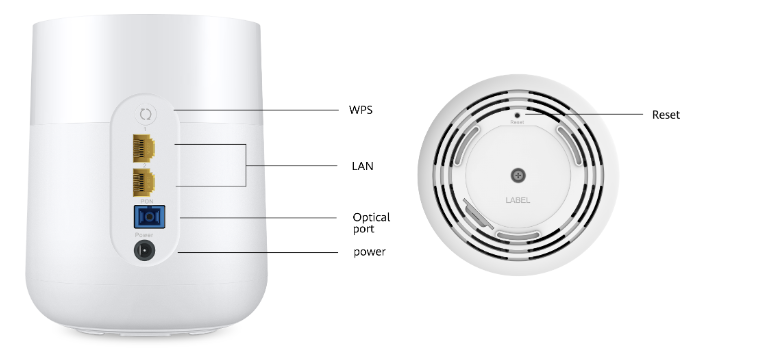
K662d Key Features
- User-side ports: 2 x GE + 2.4 GHz & 5 GHz Wi-Fi 6
- True gigabit Wi-Fi: Supports the next-generation Wi-Fi 6 technology with 2x2 MIMO (2.4 GHz and 5 GHz) and 160 MHz frequency band, delivering a physical air interface rate up to 3000 Mbit/s.
- Optical fiber for upstream transmission: Supports optical fibers for upstream transmission, and works with the master FTTR to extend fibers and gigabit coverage to every room.
- VR/4K over Wi-Fi: Supports high-bandwidth and low-latency services such as VR/4K over Wi-Fi.
- Seamless roaming: Supports roaming between different master and slave FTTRs without service interruption. The handover time is less than 50 ms.
FTTR Solution
FTTR all-optical Wi-Fi solution: K662d can work with the
Master FTTR to provide ultra-high-speed gigabit Wi-Fi coverage for the entire house.
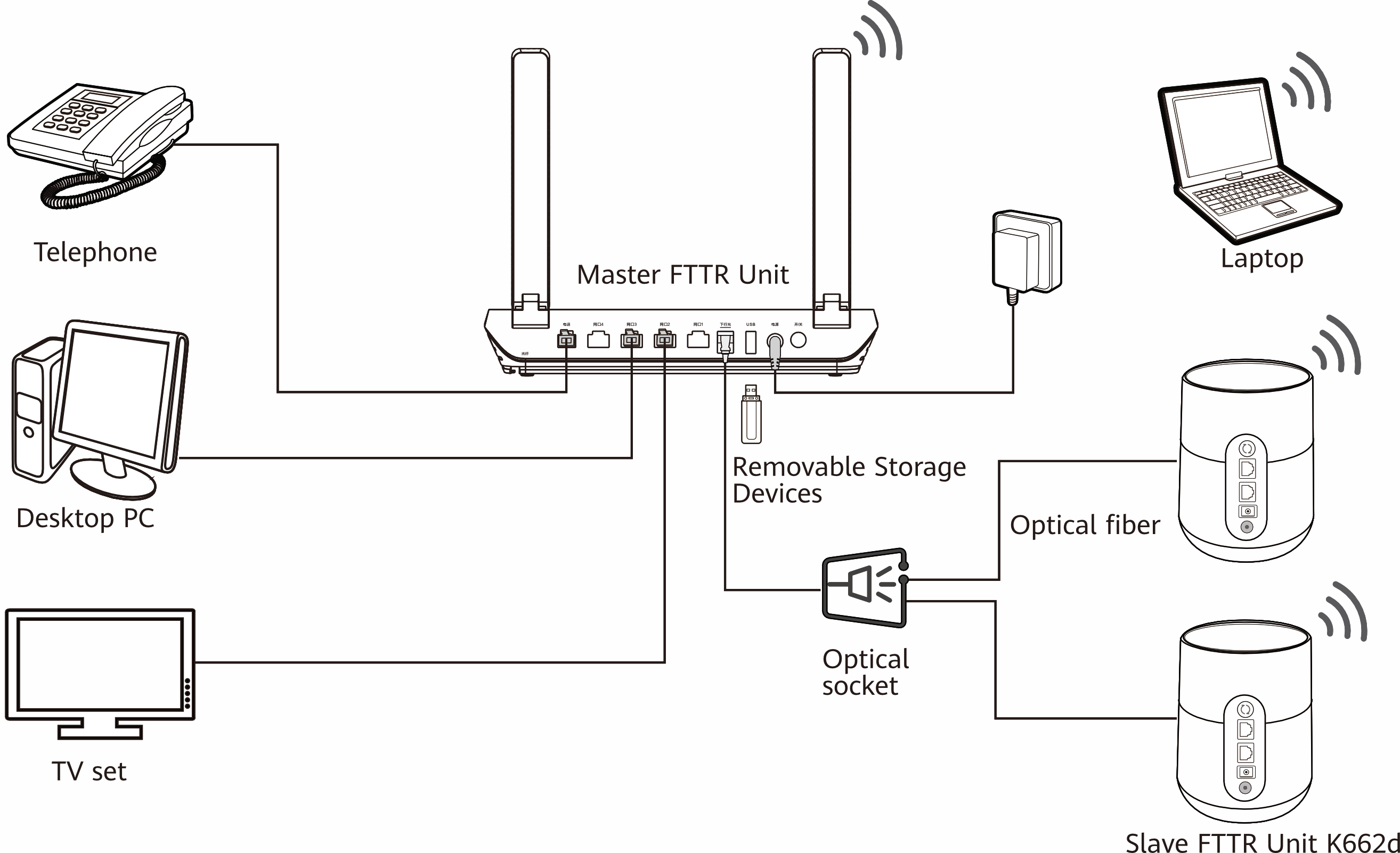
- HN8145XR master ONT with 4GE+1USB+1POTS+2.4G/5G WIFI6 5dBi
- K662d slave ONT with 2GE+2.4G/5G WIFI6 5dBi
- ATB2115-SI-5U Optical Splitter
- ATB2116-T-1 Optical Fiber Panel
K662d Compatible OLT
K662d Datasheet
| Item |
Specifications |
| Model |
K662d |
| Connector |
SC/UPC |
| WiFi |
IEEE 802.11 ax (2.4GHz&5GHz)
2.4GHz Wi-Fi 6: 2dBi
5GHz Wi-Fi 6: 4dBi
2×2 MIMO (2.4GHz&5GHz)
160 MHz frequency band |
| Air interface rate |
574 Mbps (2.4GHz)
2402 Mbps (5GHz) |
| Configuration |
2GE+2.4GHz & 5GHz Wi-Fi 6+1 Optical port |
| Function |
Work with main FTTR to realize fiber to the room , plug and play |
| Transmission rate |
Downlink rate 2.488Gbit/s
Uplink rate 1.244Gbit/s |
| O&M |
WebUI |
| Working mode |
Bridge mode |
| Operating temperature |
0°C to 40°C (32°F to 104°F) |
| Operating humidity |
5% to 95%, non-condensing |
| Power consumption |
< 12 W |
| Power supplyx |
12 V DC, 1 A |
| Power adapter input |
170 V to 240 V AC, 50/60 Hz |
| Dimensions |
Diameter: φ109 to φ117mm |
| Height: 145mm |
| Weight (excluding adapter) |
< 700 g |
| Shell color |
White |
K662d FAQ
Q1: What can I do if a problem occurs when I set the Internet access mode in a wired network expansion scenario? How to restore the factory settings of the device?
A1: Press and hold the Reset button of the device for more than 2 seconds using a needle, and release the button after the indicator turns off.
After the device restarts and the red indicator turns on, the factory settings are restored. After the K662d is restored to factory settings, connect it to the
Master FTTR. The device automatically synchronizes the configuration of the Master FTTR. The K662d does not need to be configured.
Q2: Does the device support 5G Wi-Fi? How to connect to the 5G Wi-Fi?
A2: Yes. The device supports 5G Wi-Fi. By default, the 2.4G/5G Wi-Fi names are the same. The device automatically connects to an optimal frequency band. To fix the connection to the 5G frequency band, disable the Dual-Band Steering as follows:
- To fix the connection to the 5G frequency band for the FTTR solution, configure it on the Master FTTR. The K662d will be automatically synchronized.
- To fix the connection to the 5G frequency band for one room, configure it on the the K662d. For the configuration method, please refer to the following steps:
- Connect a mobile phone to the Wi-Fi network of the device.
- Enter the IP address in the address box of a browser and press Enter. (For details about the IP address, see the product nameplate.)
- On the displayed login page, enter the login password as prompted.
- Choose My Wi-Fi and turn off Dual-band Combination. Then, two Wi-Fi names are displayed. Connect to the Wi-Fi with the suffix _5G.
Q3: How to change the Wi-Fi name and password of the device?
A3: For the FTTR all-optical Wi-Fi solution, you are advised to change the Wi-Fi name and password on the Master FTTR. The K662d automatically synchronizes the modification.


